
Introducing support for Imperial and Canadian units
Divebase has spoken metric since the very first day, and for a lot of you that has been the one thing standing between a trial and a logbook. I dive in Europe, I learned in metres and bar, and every screen I built assumed you did too. Meanwhile the messages kept arriving, from the US, from Canada, from the UK, many asking the same obvious question: can I see my depths in feet?
From today, yes. Divebase now reads and writes feet, Fahrenheit, psi, and pounds, and you choose each one on its own.
This is the update I've been slowest to ship, and not because converting a number is hard. It took this long because a careless unit preference is exactly the kind of feature that corrupts a logbook. I wanted the foundations under it before a single foot reached a screen.
The same dive, two readings
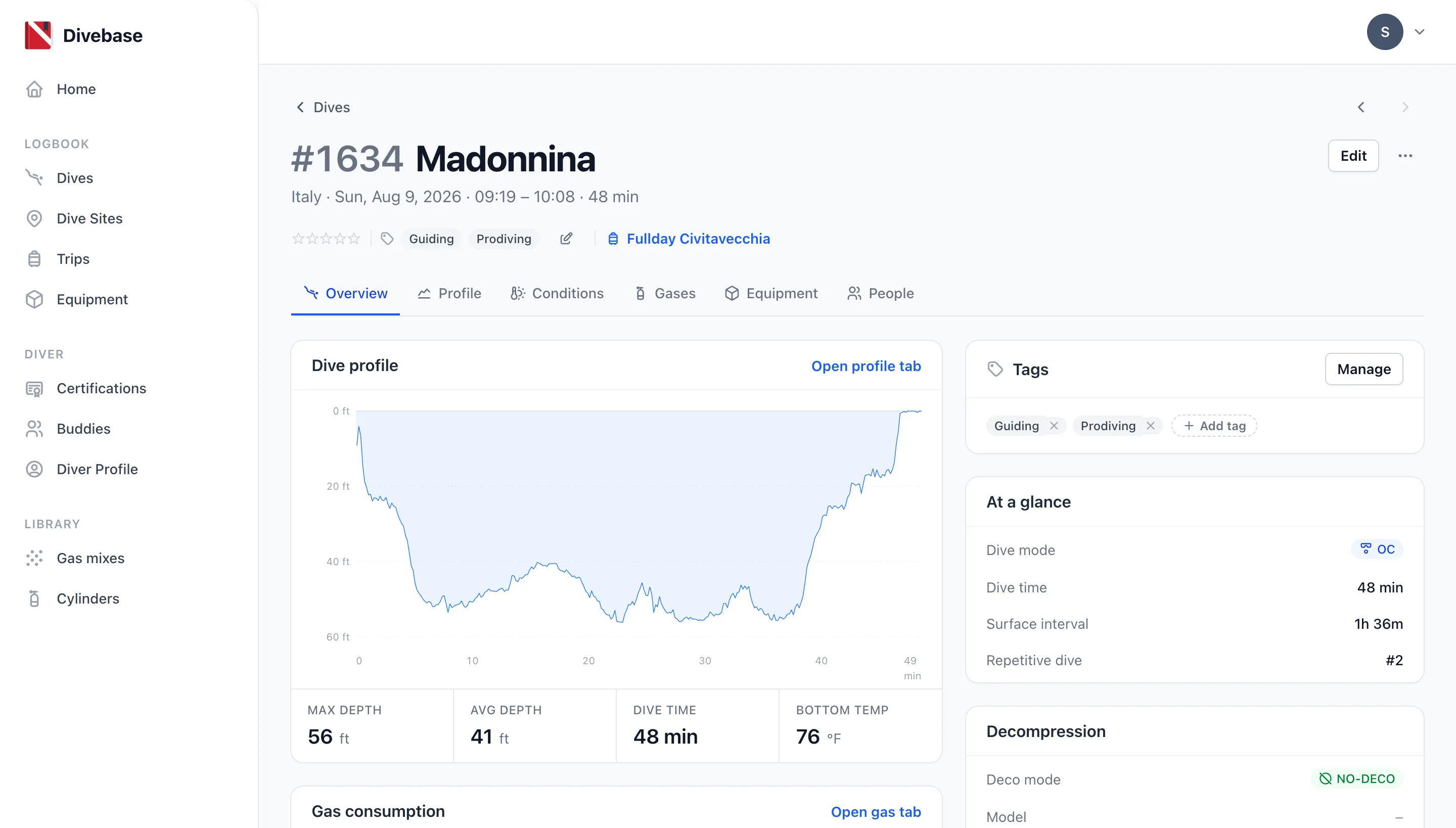
Here's how a dive now reads in feet and Fahrenheit.
And here is the very same dive, the very same database row, read in metres and Celsius.
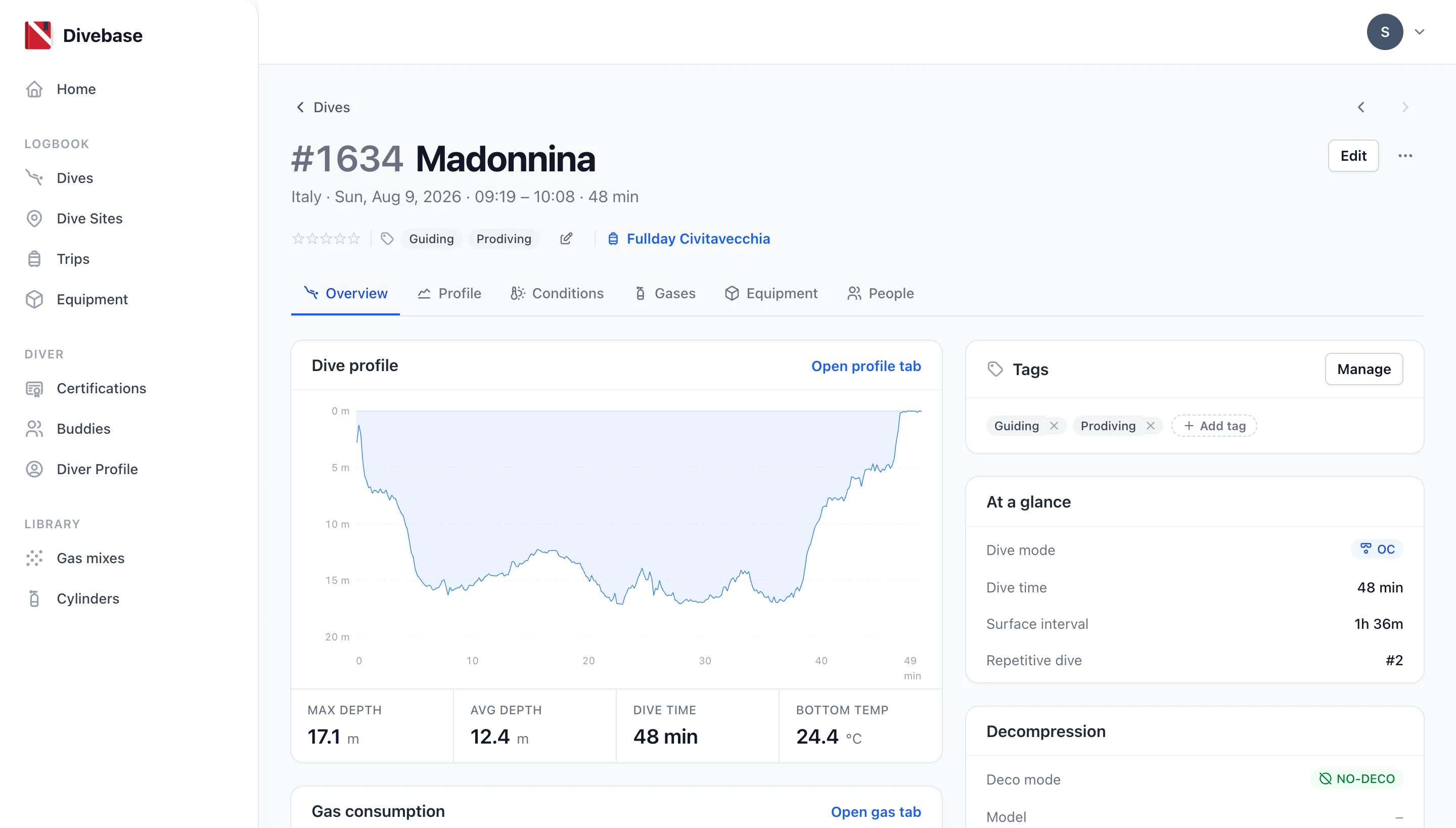
Nothing was converted, migrated, or rewritten between those two screenshots. I changed a setting and reloaded the page. Your dives are stored exactly the same way whichever you pick: the choice changes what a screen shows you and what a form asks you for, and nothing else. Set it to feet, look around, set it back to metres, and your logbook is byte for byte the logbook you started with.
Notice the profile chart, too. The axis is in feet because you are, and so is the tooltip you drag along it and the sample table underneath.
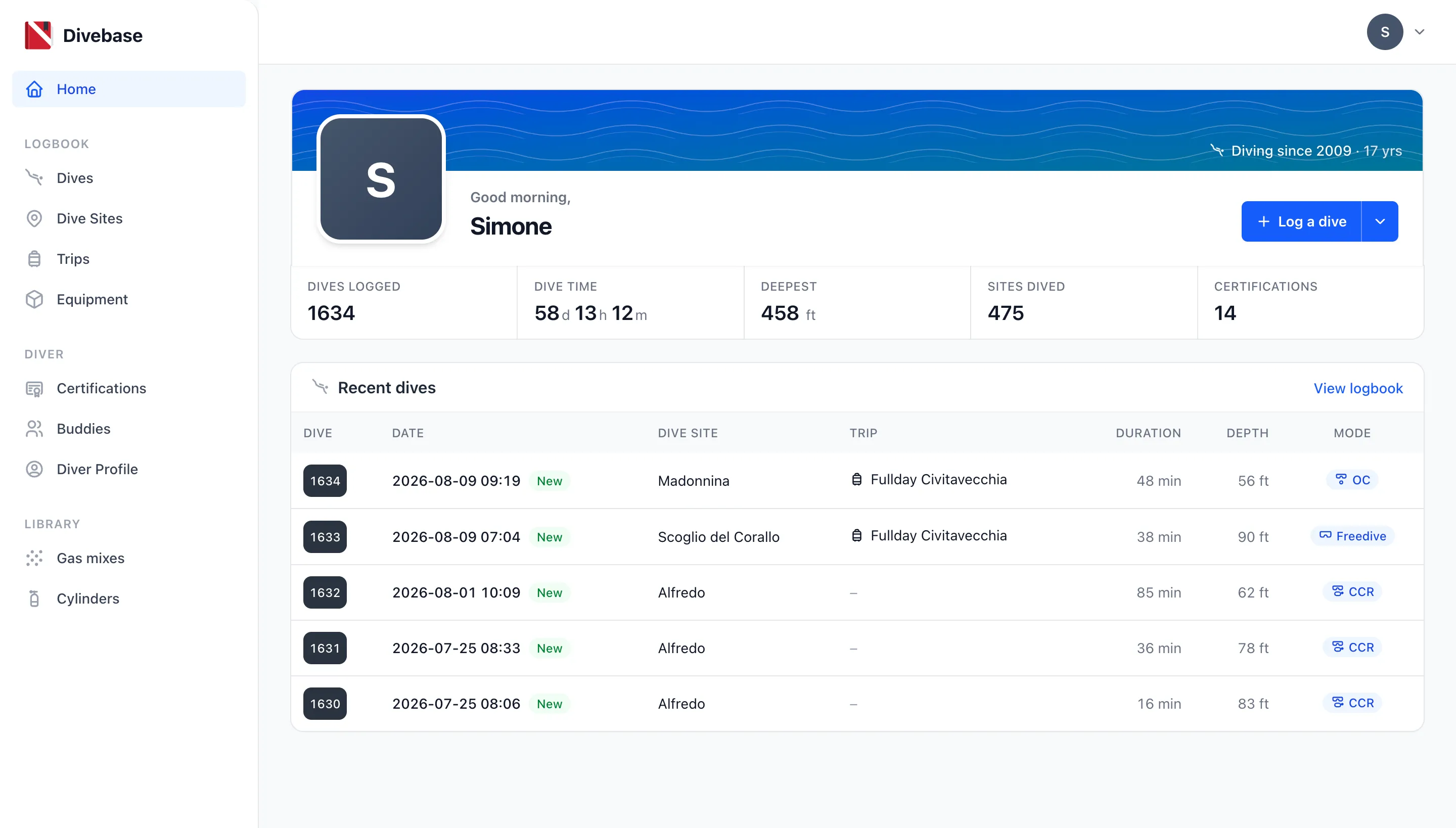
It reaches the rest of the app the same way. My deepest dive reads 458 ft on the dashboard where it used to read 139.7 m, and the depth column follows it right down the dive list.
Four choices, not one switch
Your account now carries four independent choices:
| Choice | Options | What it changes |
|---|---|---|
| Length | Meters, Feet | Max and average depth, visibility, dive site altitude, and the ascent rate on your profile |
| Temperature | Celsius, Fahrenheit | Air temperature, minimum and maximum water temperature, and the temperature trace on your profile |
| Pressure | Bar, PSI | A cylinder's working pressure, the start and end pressures of every gas, and the tank pressure trace on your profile |
| Weight | Kilograms, Pounds | The ballast you carried on a dive, and the weight of each piece of gear |
What the table doesn't have is a metric / imperial master switch sitting above it. Leaving that out is the most interesting lesson I took from this whole update; more on it below.
Where to set it
Open the menu at the top right, choose Settings, and you'll find a new Units panel showing what you currently read.
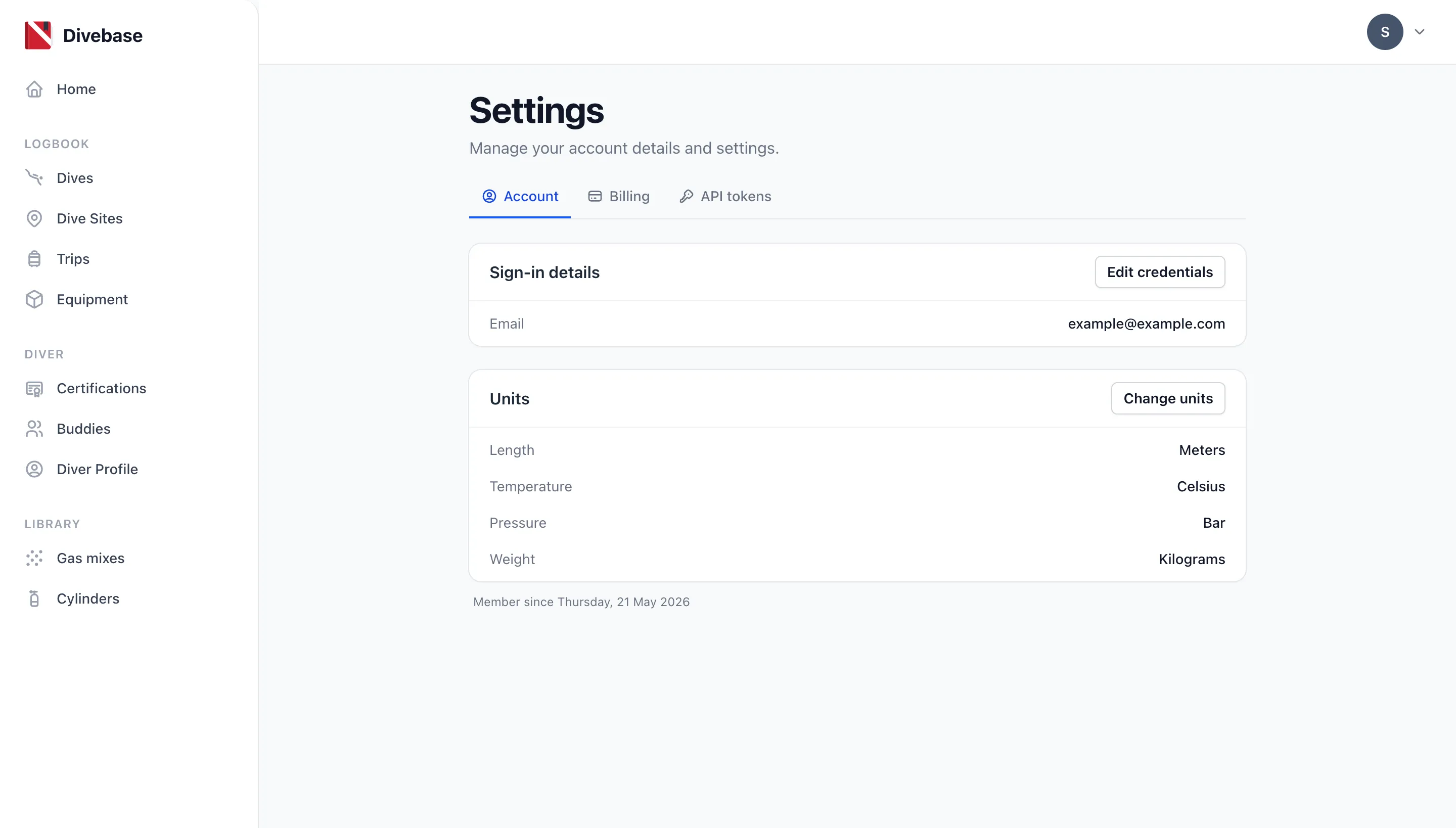
Click Change units and pick one option per row.
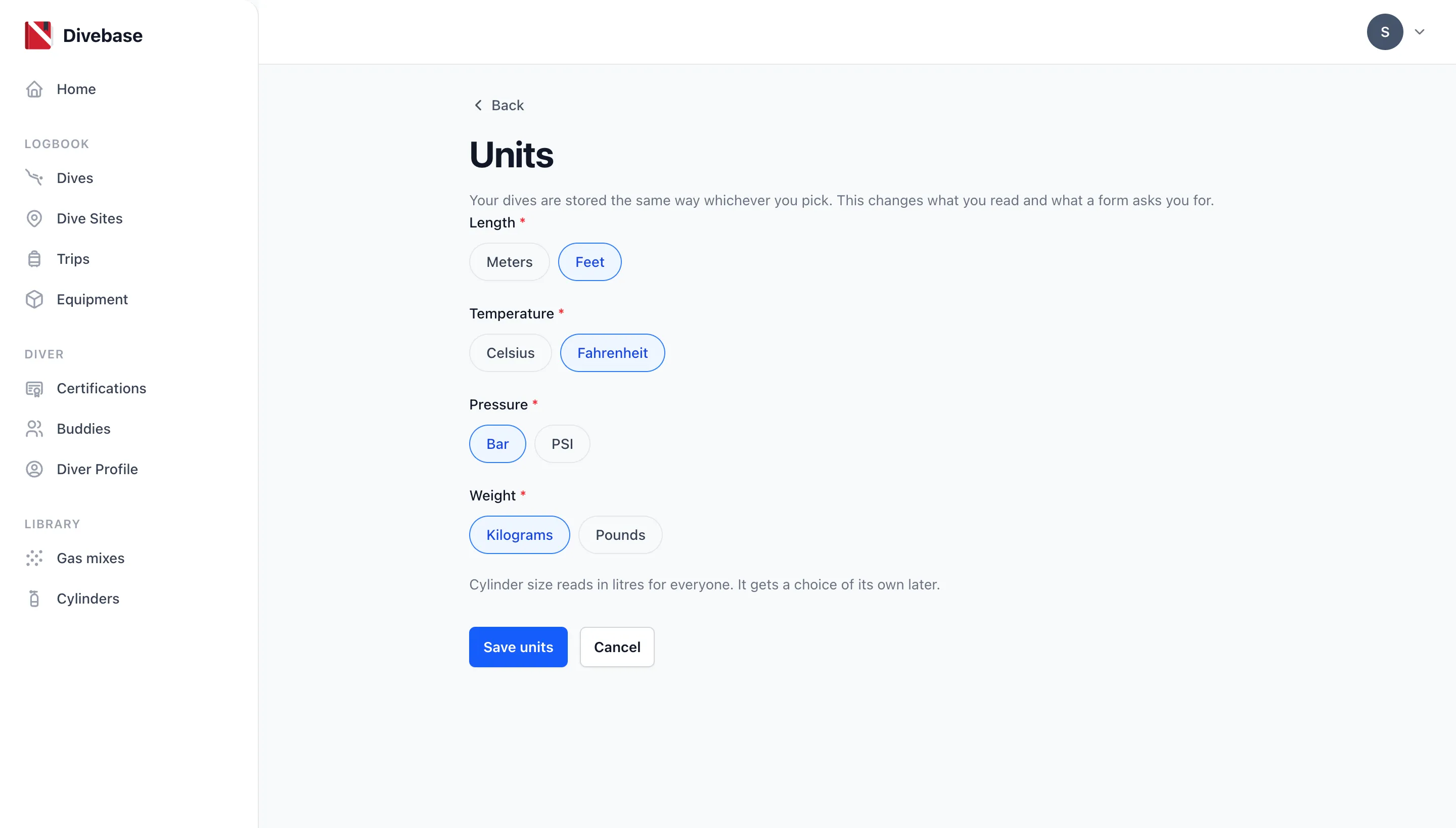
Look closely at that screenshot: I've picked feet and Fahrenheit, and left pressure in bar and weight in kilograms. That isn't a half-finished setting; mixing them is the whole idea.
And you type in your own units too
Reading is only half of it. If you read feet, you type feet. Every form opens with the stored dive already converted, labels each field with the unit it's asking for, and steps in sensible increments for that unit.
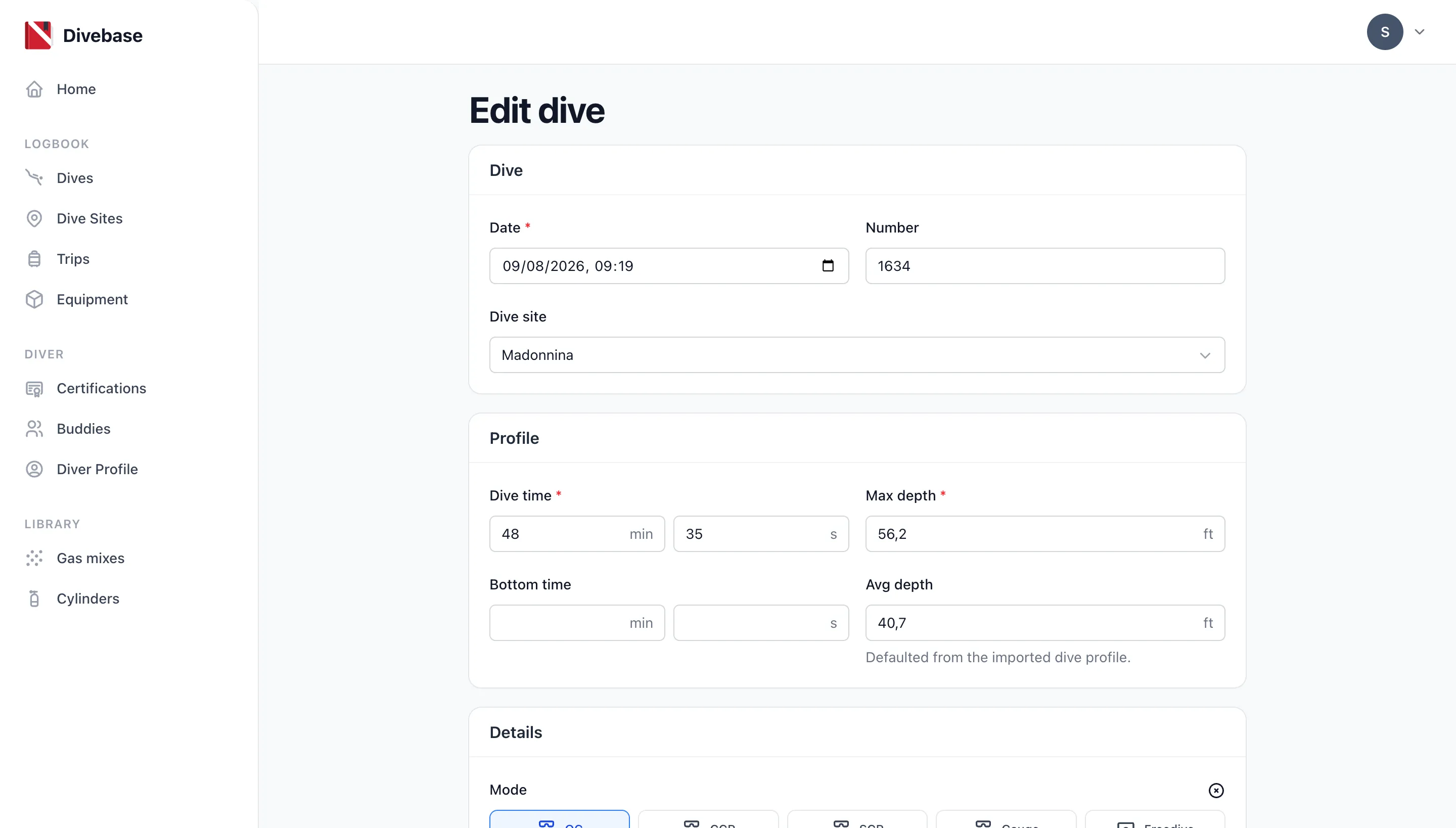
One detail: the dive page shows 56 ft but the form offers 56,2. That's on purpose. A reading is rounded to be legible, while a field has to hold everything the record does, so the field is always the more precise of the two. It's what stops your numbers eroding a little every time you open a dive and save it.
The hard parts
Three things made this take longer than it looks. If you're here for the diving rather than the engineering, skip ahead, you've got everything you need.
The first arrived while I was still sketching the settings screen. A MacDive user wrote in to say his import had landed in the wrong units, and digging through his file I found that MacDive doesn't offer two presets, it offers three: Metric, Imperial, and Canadian. Canadian is feet and psi with Celsius. Which is exactly right! Plenty of divers measure depth in feet and water temperature in Celsius, and they aren't confused, they're Canadian. That one file killed the master switch I'd sketched: if a real preset can mix and match, the model has to be one choice per kind of measurement.
The second was precision. A standard aluminium 80 is stamped 3000 psi. Convert that and it's 206.84 bar, and if you store it as a whole number of bar (207) it reads back as 3002 psi. Nobody wants a logbook that restamps their tank every time they look at it. Worse, opening a dive and saving it untouched would push the rounded display value back into storage, so a record would drift a little further with every edit. Fixing it meant widening the pressure columns and teaching the forms that "unchanged" means unchanged. Enter a value in your own unit and you read that exact value back, and that's now a promise the test suite enforces.
The third was temperature, which behaves unlike the rest. Feet, psi, and pounds are all just a multiplication. Fahrenheit isn't: it carries an offset, which means a temperature reading and a temperature difference convert by different rules. Half a degree warmer is +0.9 °F, not +32.9 °F. Nothing in Divebase shows you a temperature spread today, but the day it does, the right conversion is already sitting there waiting for it.
Your imports have been updated
If you've already brought a logbook in, this part matters to you.
The MacDive import got the most attention by far, because MacDive is the format where the units really are ambiguous. Its database normalises some values and leaves others in whatever the app was displaying, and it records the preference nowhere in the file. Divebase now works out which preset a file was written under, from the file itself, and converts accordingly: tank sizes, fill pressures, ballast, and free-text visibility included. The XML export was the worse offender, because it converts nothing and simply declares the preset at the top. That's why some imperial imports previously arrived with feet read as metres.
The Subsurface, Shearwater Cloud, UDDF, and Garmin FIT imports all declare their units inside the file, so they were already on solid ground. I re-tested every one of them anyway.
Please go and look at your imported dives. I've tested against every file I have, but that means my own logbook plus the handful of files people have kindly sent me, and that's not the world. If a depth, a pressure, a tank size, or a weight looks wrong, tell me. A dive that reads 328 ft is far more useful to me as a bug report than as a personal best.
Not yet
There are a few missing bits, which will be added over the next few iterations. The notable ones are:
- Cylinder size still reads in litres for everyone. It's the one measurement that isn't a plain conversion: a tank's imperial rating in cubic feet depends on its working pressure as well as its volume, so it needs its own treatment in the settings and in every form that touches a cylinder. It's next.
- The API doesn't carry your unit preference. Everything it returns is metric, and it stays metric for now. Putting a display preference on the wire is a decision I want to make once and get right, and it needs more design and testing than this release had room for. If you're building against the API, nothing changes for you today.
That's the biggest quality-of-life update Divebase has had. If you've been waiting on this one before moving your logbook across, the water's fine.
Until next time, dive safe! 🤿