
Renumber your dives
Dive numbers go wrong in small, boring ways. You delete a duplicate from the middle of a trip and every dive after it is off by one. You import a week from a computer whose counter restarted, or the same trip twice from two sources. You log a day by hand and guess the numbers. None of it is dramatic, and all of it leaves a logbook you can no longer trust to count.
From today Divebase fixes it in one pass. Select the dives, press Renumber, and the selection is rewritten in logbook order: the numbers, the repetitive series, the surface intervals, or any combination of the three you ask for.
Select first
The dives list now has a checkbox on every row. Tick a few, or the one in the header for the whole page, and a bar rises from the bottom with the count and the actions that work on several dives at once. Renumber is one of them; Delete is the other.
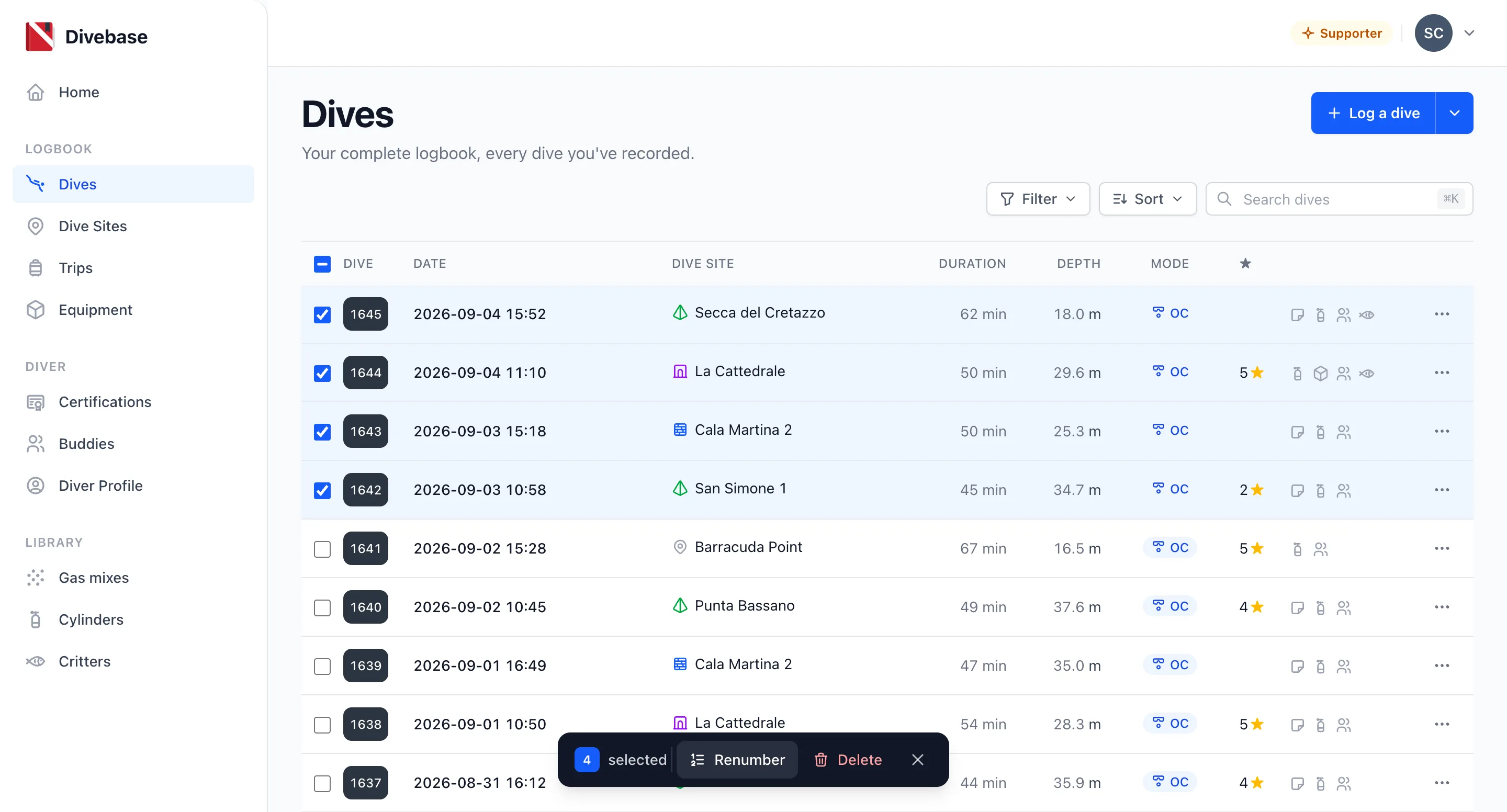
Yes, this is the multi-select I said tags were waiting for. It's here for numbering first, because that's where I needed it most.
The renumber actions
Renumber opens a small dialog with two options, both on by default.
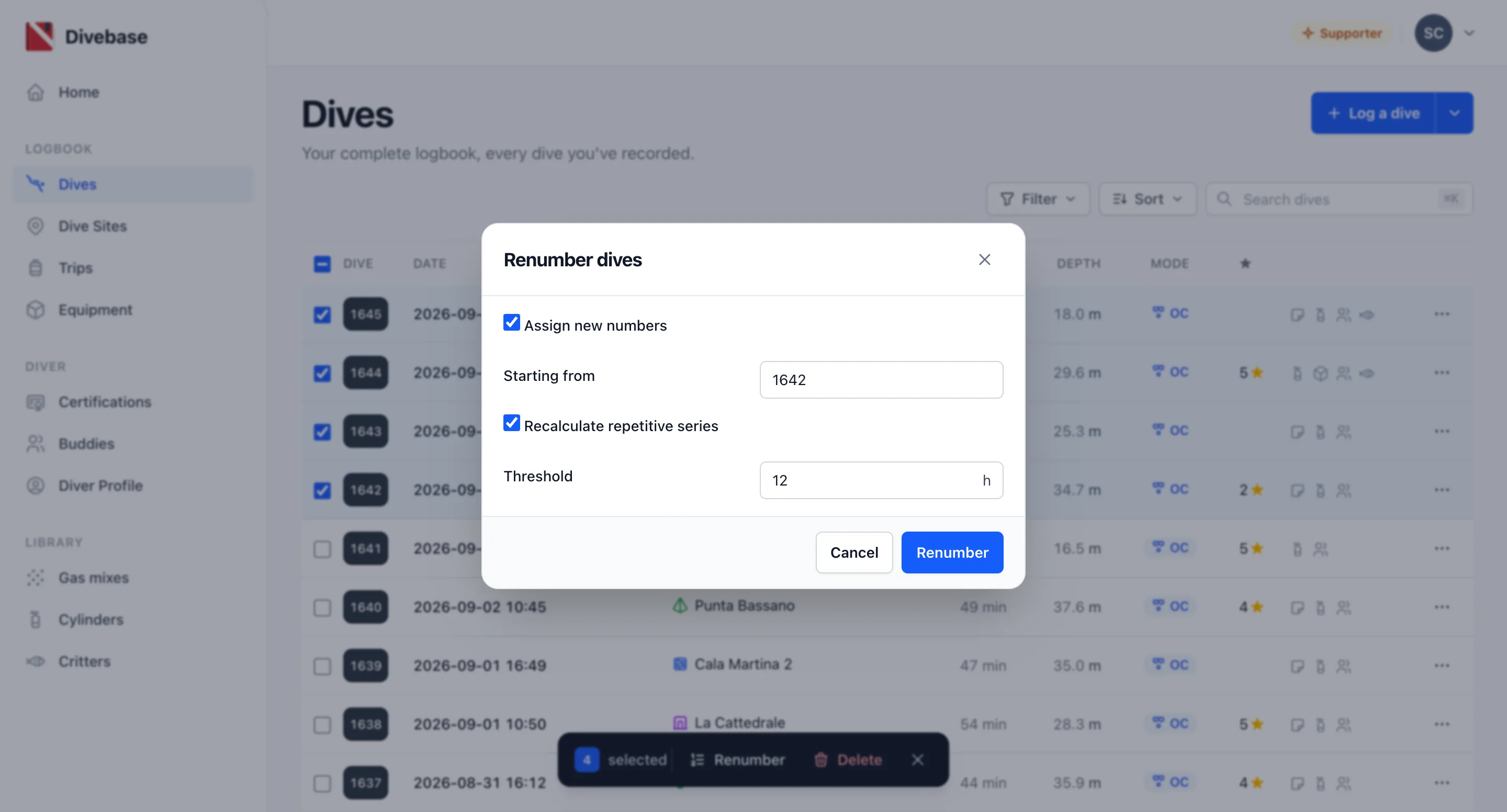
Assign new numbers hands the selection a fresh sequence, starting from the number you give it and going up by one in order of when each dive started. The starting number is pre-filled with the lowest number in the selection, so the common case, closing a gap without moving the first dive, is a click on Renumber and nothing else. If no selected dive carries a number yet, it starts at 1.
Recalculate repetitive series does the other half of the bookkeeping, the half that nobody enjoys doing by hand. Walking the selection in order, Divebase measures the gap from the end of one dive to the start of the next. If the gap is within the threshold, the next dive continues the series: it takes the next repetitive number and the gap becomes its surface interval. If the gap is longer, the dive starts a new series at 1 with no surface interval. The threshold is yours to set, in hours, and Divebase remembers the last value you used. Twelve hours suits the way I dive; twenty-four is the default.
Untick either box and the other runs alone. If you've only deleted a dive, you probably want the numbers and nothing else; if you've just imported a trip that came in as a flat list of firsts, you want the series and can leave the numbers as they are.
Some additional details
The selection is the whole world. Divebase orders the selected dives by their start time, not by the numbers they carry today and not by the order you clicked them in, and nothing outside the selection changes. That's deliberate: some of you keep more than one logbook in the same account, and a series that reached past the selection would chain dives you left out on purpose.
Because a dive number is a label rather than a key, a renumber can hand out a number that another dive outside the selection already has. Divebase won't stop you, and it tells you how many dives actually changed so you can spot it. If you want the whole logbook consistent, select the whole logbook: the selection covers what's on the page, and the page goes up to a hundred dives.
Every change is an ordinary edit under the hood, so it syncs to your phone like any other. The iOS and Android apps offer the same Renumber with the same rule, and the same selection gives the same result whichever one you use.
This idea was borrowed from MacDive, which has offered this feature for quite some time. As previously mentioned, Divebase was heavily influenced by MacDive: as a long time MacDive user, I really wanted to bring a similar experience. Divebase also provides a MacDive importer to import an existing logbook into Divebase.
Go count your dives properly, and, as always, dive safe! 🤿